Grammarly Pro renews at $144 a year, or $360 if you pay monthly. If the suggestions you actually click are spelling fixes and the odd missing comma, that money buys very little a free tool would not. And if your drafts start in ChatGPT, the problem your reader notices is one Grammarly was never built to catch.
We make RemoveAISlop, so it appears first and gets a full click path below. We have tried to be as plain about where it falls short as we are about everyone else. Where Grammarly is still the better buy, there is a section saying so.
What Grammarly costs, and what you are paying for
Grammarly's own plans page lists Pro at $12 a month billed yearly, which is $144 (about €128), while monthly billing runs $30 (about €26.70). A five-person team on monthly billing spends $1,800 a year (about €1,600) before anyone opens a document.
Euro figures converted at the rate on the published date and rounded. Check each vendor's pricing page for the current charge in your currency.
The free plan corrects writing mistakes and shows your tone, but it caps you at 100 AI prompts a month and leaves out full-sentence rewrites, plagiarism detection and AI-text detection. Pro raises the prompt allowance to 2,000 a month.
So the paid tier is increasingly a generative AI product. That is fine if you want a model writing alongside you, but it is a strange purchase if what you wanted was a second pair of eyes on text you wrote yourself.
Why a correct draft can still read as machine-written
A grammar checker answers one question, whether a sentence is correct, and generated text almost never fails it.
The trouble is what correct text sounds like now. The Pew Research Center examined around 500,000 web pages in August 2026 and found AI authorship signals in 10% of them, rising past a third among pages published after ChatGPT launched. Em dash use doubled over the same period, and the "it's not X, it's Y" construction nearly tripled.
Every one of those patterns is grammatical, so a correctness checker has no reason to flag any of them.
Vocabulary shows the same drift. Kobak and colleagues counted words across 15 million PubMed abstracts in Science Advances in 2025. "Delves" appeared 25.2 times more often in 2024 than its earlier rate predicted, and at least 13.5% of 2024 abstracts showed signs of LLM help. No spell-checker objects to a correctly spelled word.
That gap is the reason this list exists. Some readers need a cheaper Grammarly, while others need a different kind of check altogether.
Apps like Grammarly, side by side
| Tool | Free plan | Paid, billed yearly | Text stays on your device | Best for |
|---|---|---|---|---|
| Grammarly (for reference) | Corrections, 100 AI prompts a month | $144 (€128) | No | Coverage across Word, Outlook, desktop and mobile |
| RemoveAISlop | 5 drafts a day, unmetered extension checks | $89.88 (€80) | Extension checks, yes | Drafts that started in an AI tool |
| ProWritingAid | 500 words at a time | $120 (€107) | No | Fiction and long reports |
| LanguageTool | Website only | About $70 | Only if you self-host | Several languages |
| QuillBot | Grammar checker and extension | $99.95 (€89) | No | Paraphrasing |
| Hemingway Editor | Readability and error highlighting | $100 (€89) | Desktop app | Cutting long sentences |
| Harper | All of it | Free | Yes | Privacy on a zero budget |
| DeepL Write | Basic rewrites | Write Pro plan | No | English as a second language |
One paragraph through all eight checkers
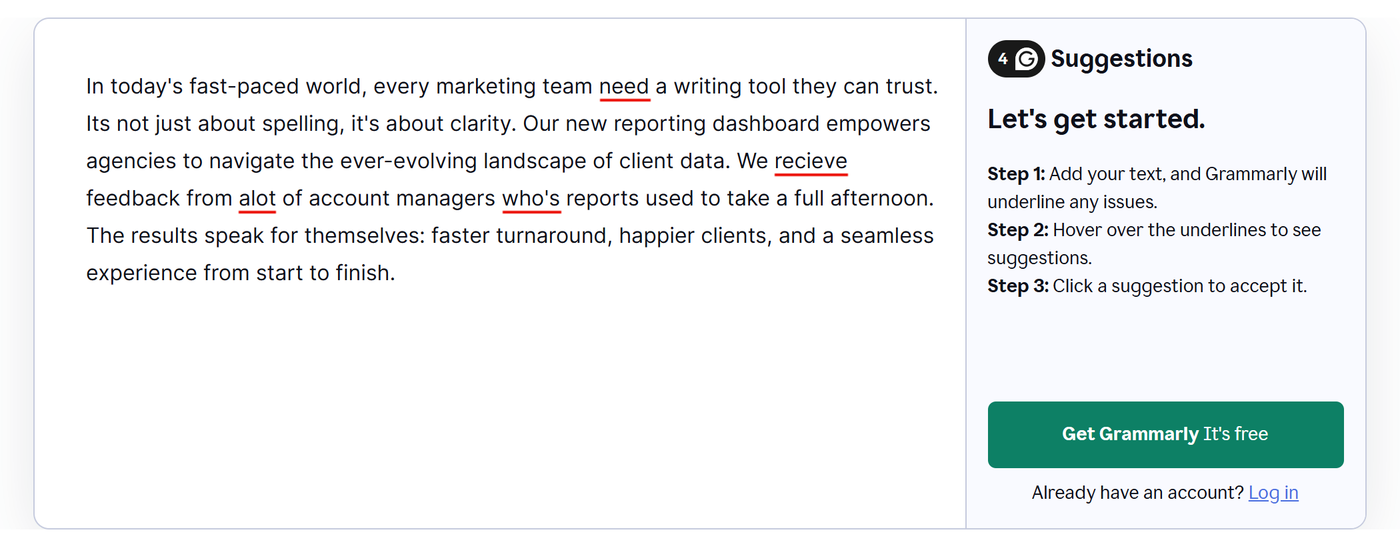
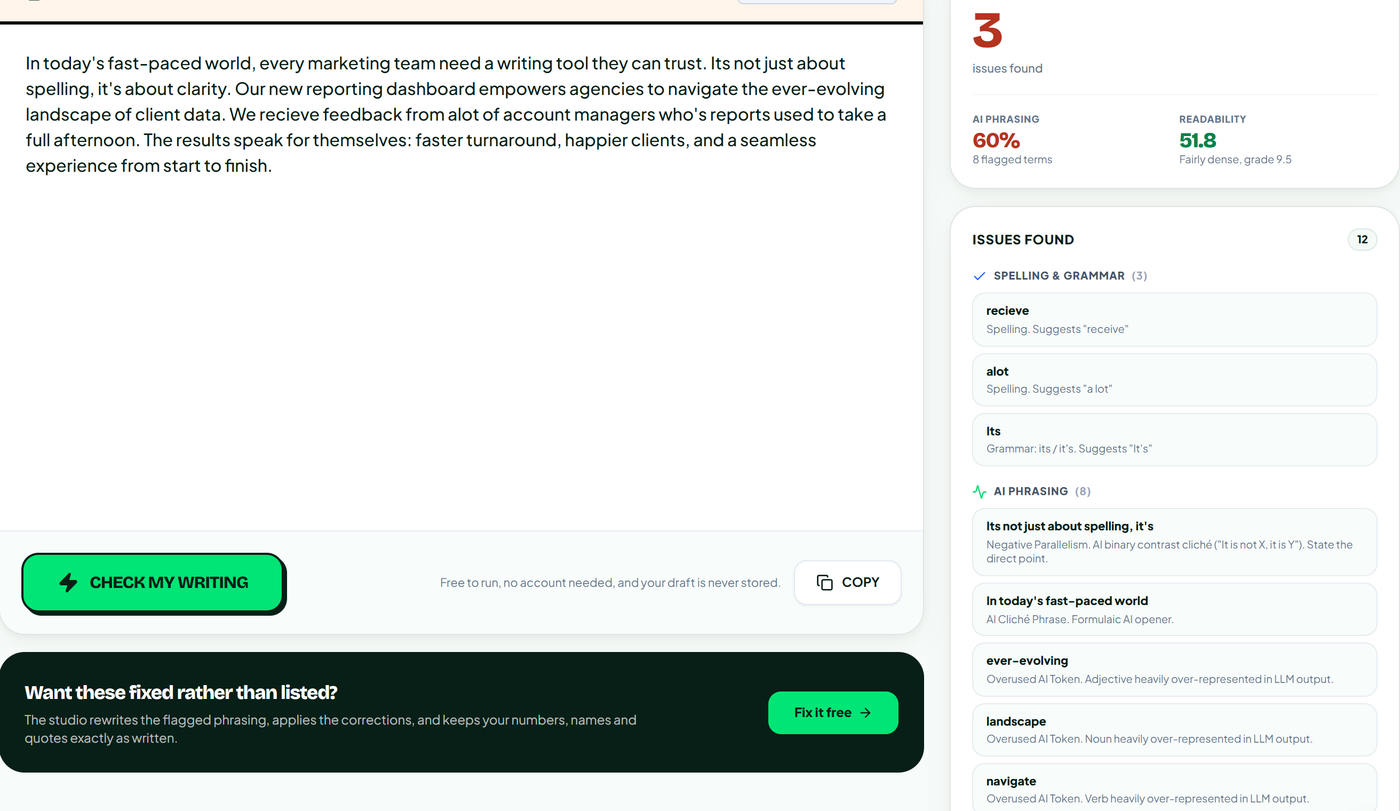
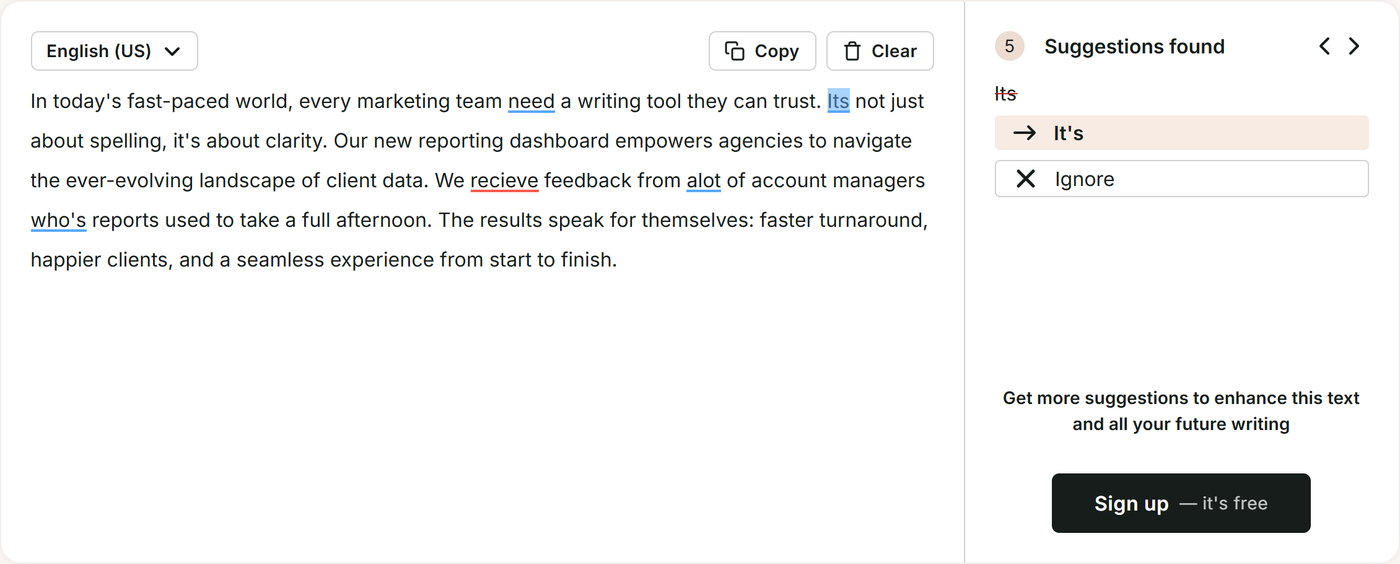
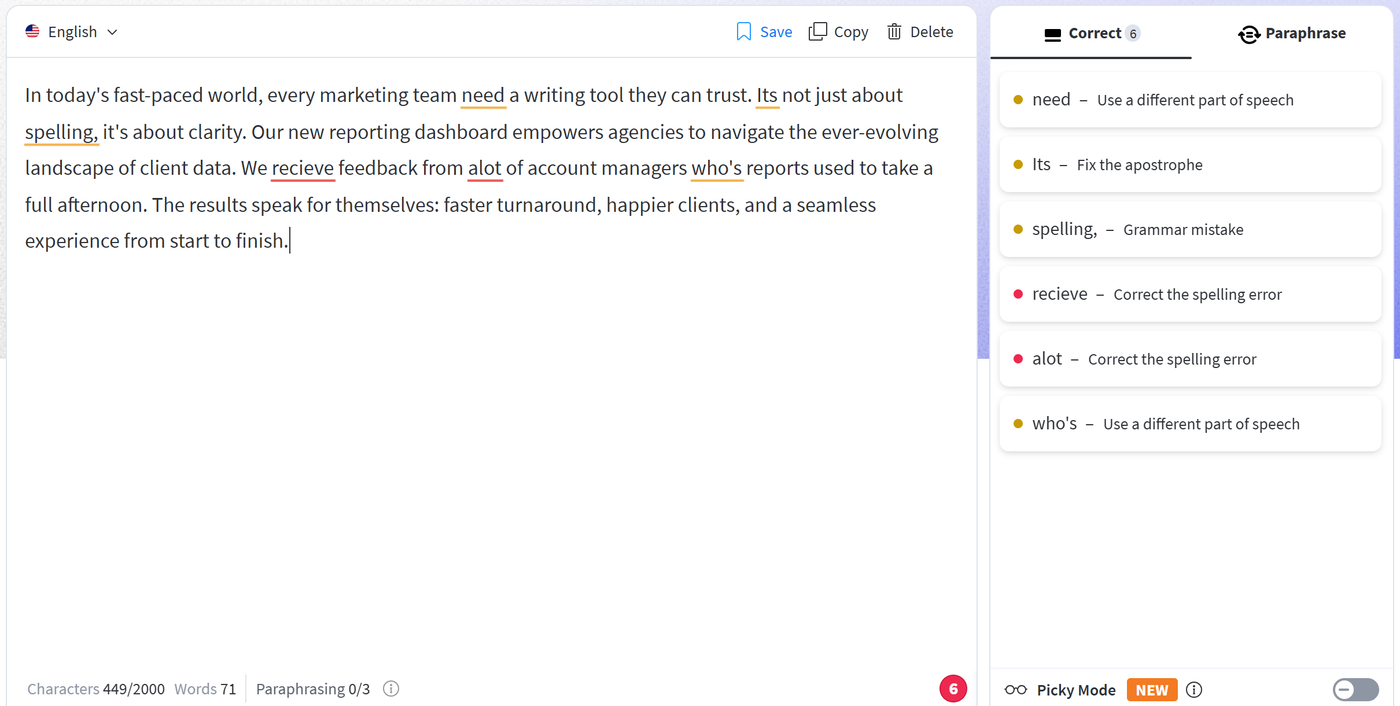
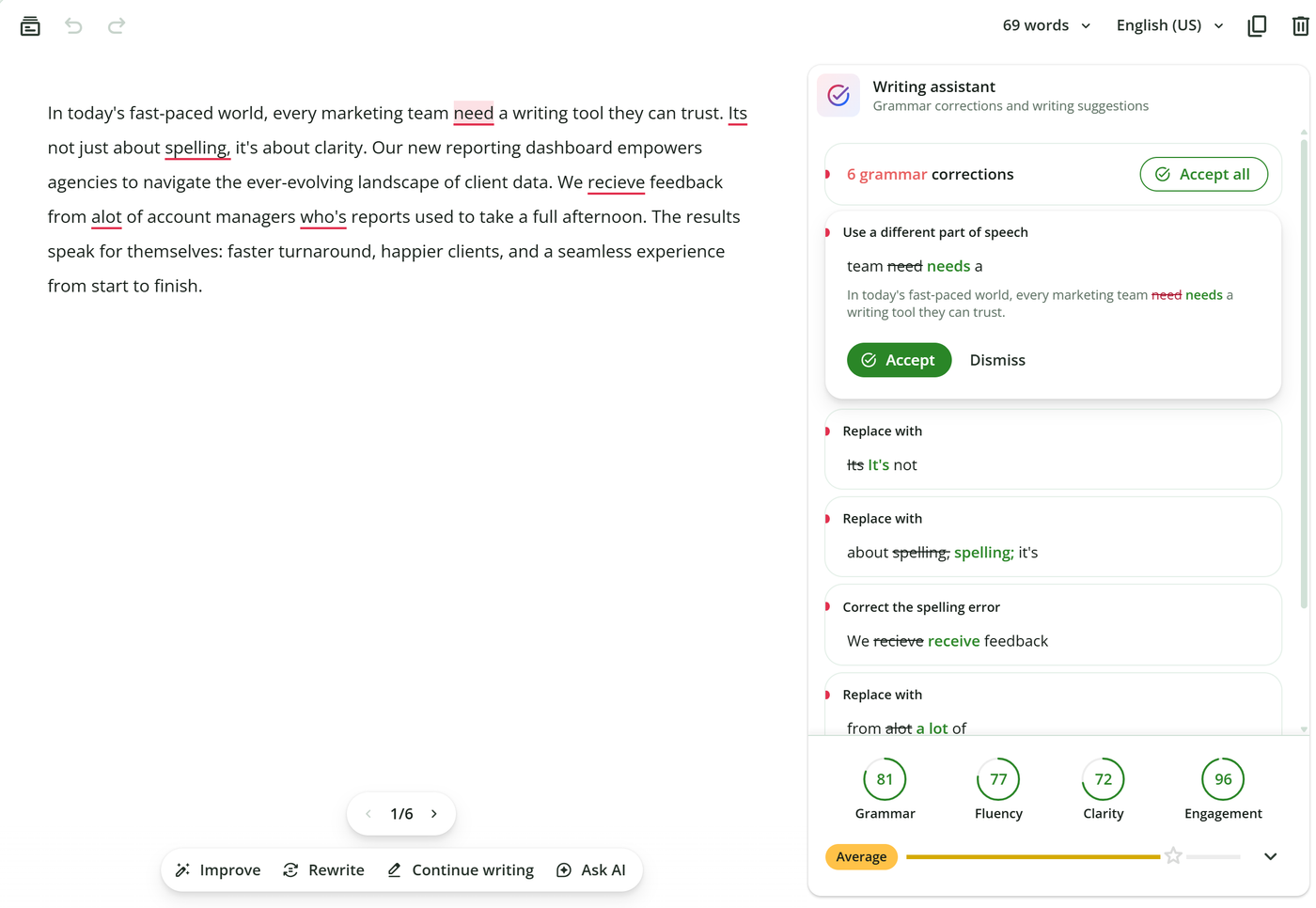
We wrote a 69-word paragraph about a reporting dashboard and planted five mistakes in it. There is a subject-verb slip, "its" where "it's" belongs, two misspellings, and "who's" in place of "whose". The same paragraph carries eight phrases our catalogue lists as typical of AI output, including a stock opener and a "not just X, it's Y" line. On 23 October 2026 we pasted it into the free version of each tool, without an account, and counted what came back.
| Tool | Mistakes caught, of 5 | AI phrases flagged | Worth knowing |
|---|---|---|---|
| Grammarly | 4 | 0 | Missed its for it's |
| RemoveAISlop | 3 | 8 | Missed the agreement slip and who's |
| ProWritingAid | 5 | 0 | Free limit of 500 words |
| LanguageTool | 5 | 0 | Also caught the comma splice |
| QuillBot | 5 | 0 | Same six flags as LanguageTool |
| Hemingway Editor | 5 | 0 | Fixing them needs Plus |
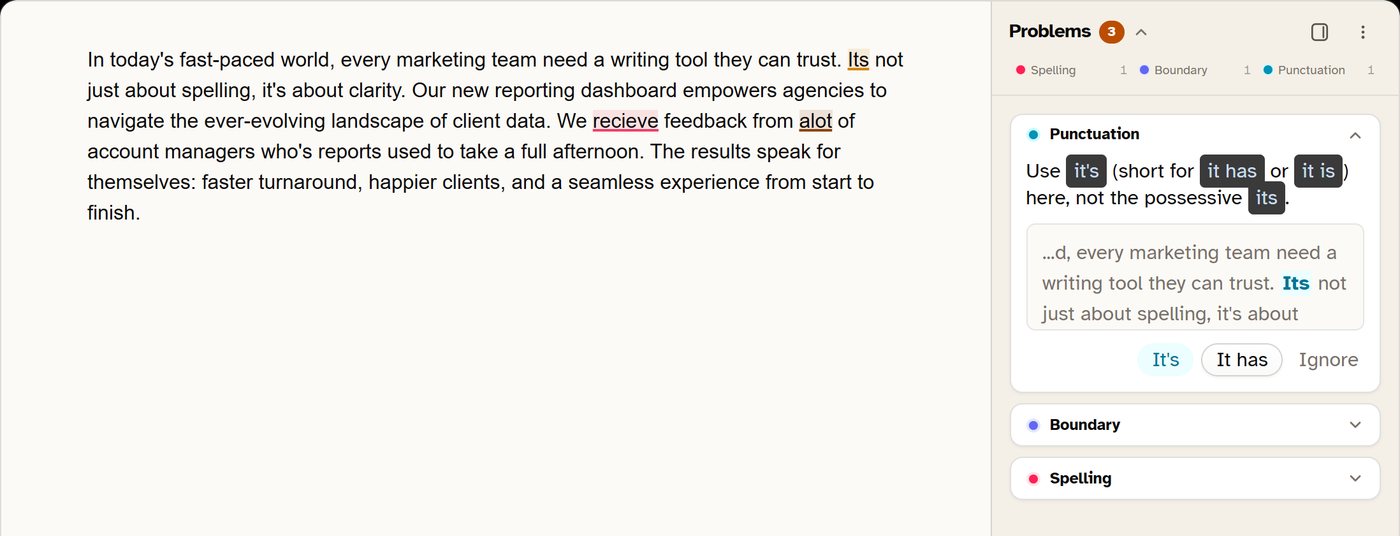
| Harper | 3 | 0 | Same two misses as RemoveAISlop |
| DeepL Write | 5 | 0 | Rewrote four other phrases |
Two results matter. Every tool except ours let all eight AI phrases through, which is the gap the rest of this article keeps returning to. Our proofreader also caught fewer mistakes than six of the seven alternatives, Grammarly included. It missed the same two errors Harper missed, and you should weigh that before you switch.
The seven alternatives, one at a time
RemoveAISlop, for drafts that started in ChatGPT
RemoveAISlop runs two checks on every draft and reports them separately. The proofreader checks spelling against a 49,000-word dictionary that accepts US and British spelling, and runs 35 grammar rules and 5 consistency checks. On our test paragraph it caught three of the five mistakes, one fewer than Grammarly. The second check asks whether the draft reads as machine-written. It scores the text against 749 catalogued terms, 30 sentence patterns and 23 formatting tells, and it measures how much your sentence lengths vary.
Both checks run on fixed rules rather than a language model, so no model ever reads your writing and the same draft gets the same result every time. The Chrome extension checks on your own machine and underlines as you type, including in Google Docs.
When you ask for a rewrite, numbers, names, quotes and links pass through unchanged, which is a promise a paraphraser cannot make.
The free plan gives five drafts a day with no account, and checks in the extension never count against that. Creator costs $7.49 a month billed yearly (€80 a year) or $9.99 monthly (about €8.90). That removes the daily limit and adds draft history, house style rules and unlimited API use. Agency runs $21.75 a month billed yearly for voice profiles measured from your own writing, bulk CSV and client reports.
It does not check plagiarism, because that needs an index of the web we do not have. It stays quiet on comma style, has no Word add-in or mobile keyboard, and checks English only.
ProWritingAid, for manuscripts and long reports
ProWritingAid treats a draft as something to study rather than just correct. Its reports cover overused words, sentence length, pacing and dialogue tags. Novelists like it because it plugs into Scrivener as well as Word and Google Docs.
The free plan checks 500 words at a time, which rules it out for anything long. ProWritingAid's pricing page lists Premium at $120 a year (€107) or $30 monthly. Premium Pro, with the AI features, is $144 a year. A lifetime licence costs $399 (€355), which pays for itself in a little over three years against the annual plan.
LanguageTool, for writing in more than one language
LanguageTool checks more than 30 languages. If you switch between English and German in the same afternoon, this is the one.
The catch arrived in 2026. LanguageTool's help centre now says the browser extension is available only on a Premium plan, which reviewers report at about $70 a year in the US. European list prices run higher, around €89. Free users keep the website checker, which takes up to 2,000 characters at a time, and developers can still run their own LanguageTool server, which keeps the extension working without a subscription.
LanguageTool and QuillBot belong to the same parent company, and LanguageTool now points free users who lost the extension toward QuillBot.
QuillBot, for paraphrasing with a free grammar extension
QuillBot started as a paraphraser and still leads with it, though the grammar checker and its browser extension are free. The paraphraser's free tier stops at 125 words per run and two modes.
Premium costs $99.95 a year (€89) or $19.95 monthly (about €17.80), and adds every paraphrasing mode plus a capped plagiarism check.
Read paraphraser output closely. It works by swapping wording, and a swapped word can change a product name, a technical term or a figure without warning. That is fine for a school summary. It is risky for a client deliverable.
Hemingway Editor, for sentences that run too long
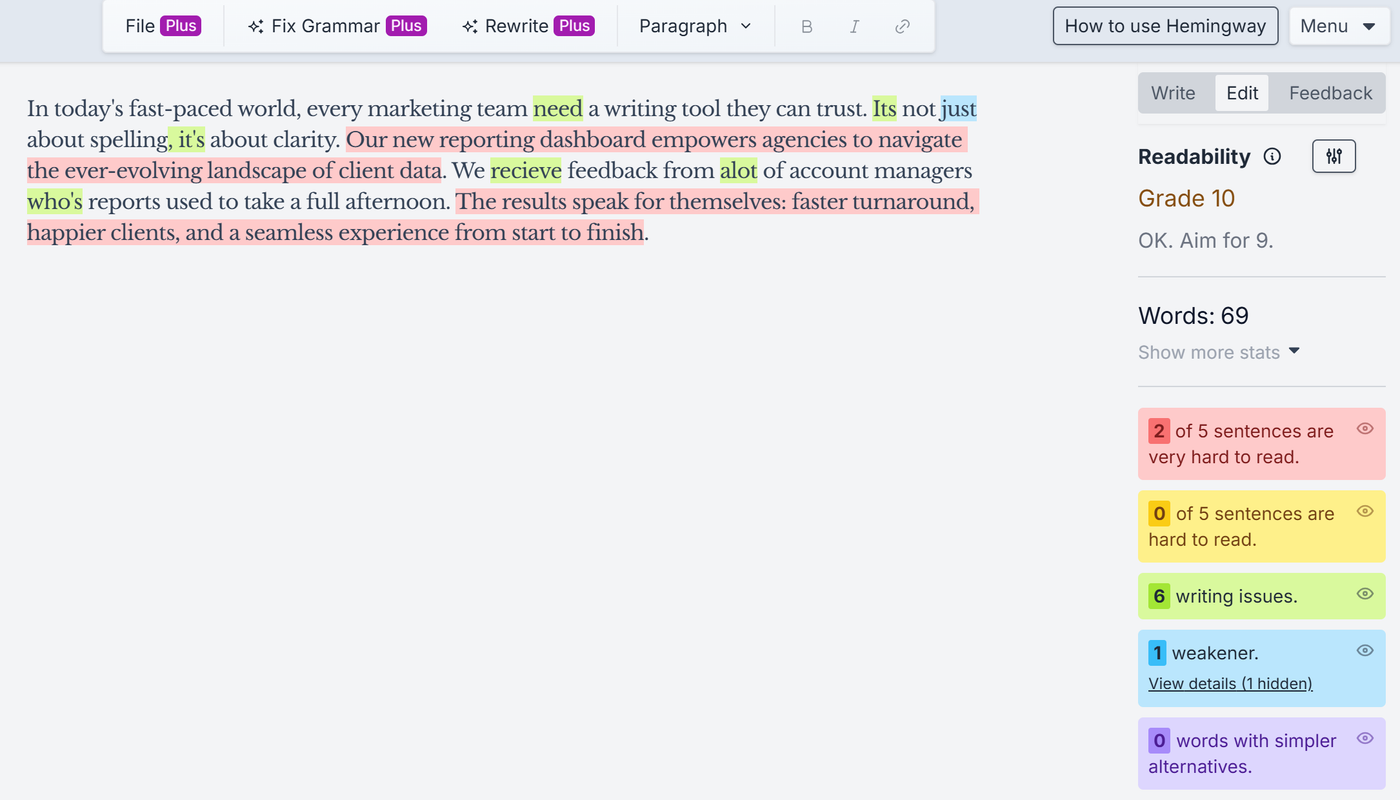
Hemingway colour-codes sentences that are hard or very hard to read, along with adverbs and passive voice. The free web editor also marks writing issues in green, and on our test paragraph it highlighted all five mistakes. The Fix Grammar button that applies corrections belongs to Plus.
Hemingway Plus adds AI-generated fixes for about $10 a month or $100 a year (€89). The desktop app is a one-off $19.99 (about €17.80) and works offline.
Harper, for a free checker that never leaves your laptop
Harper is open source under the Apache 2.0 licence, built by Elijah Potter at Automattic, and it runs entirely on your device. Your text is never uploaded, which matters if you write under an NDA or handle patient or legal material.
It ships as a Chrome and Firefox extension and as plugins for VS Code, Obsidian, Neovim and Zed. It is English only and rule-based, so it catches fewer stylistic problems than a cloud tool. It costs nothing.
DeepL Write, for English as a second language
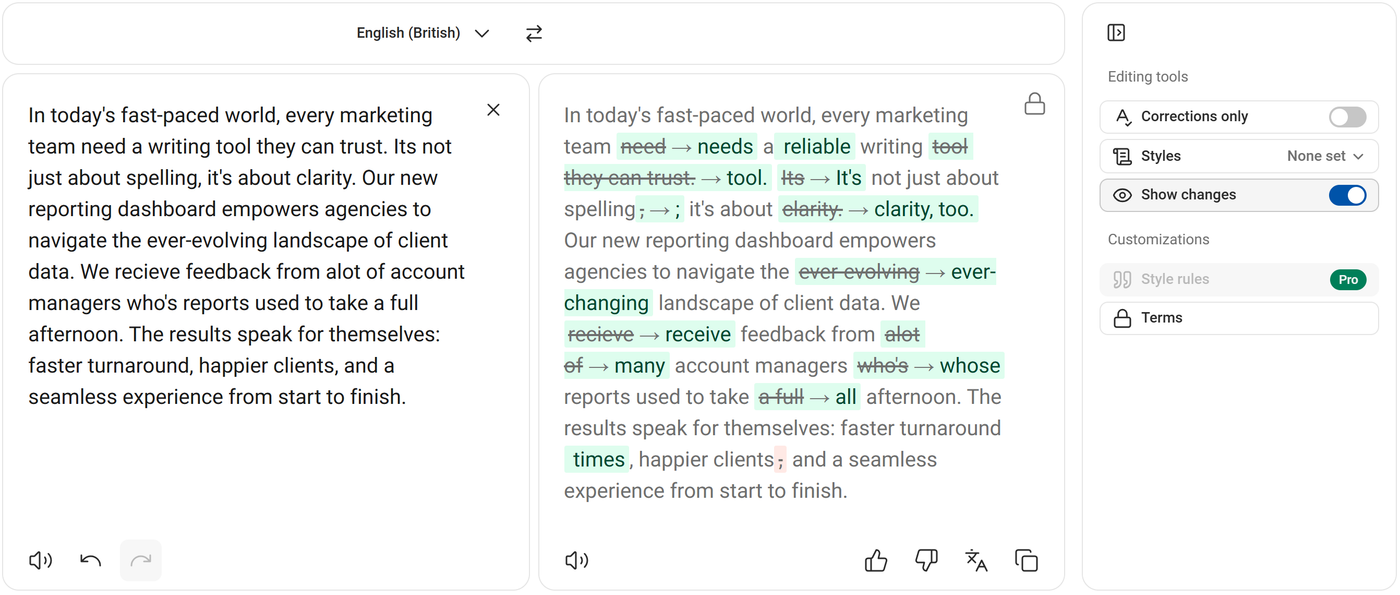
DeepL Write comes from the team behind the DeepL translator. It rewrites whole sentences into the phrasing a native speaker would choose, and offers alternatives for each one. Basic use is free, and Write Pro sits in DeepL's paid plans.
That makes it the strongest pick here for anyone writing in their second language. It also means it rewrites more than it corrects, so read the result before you send it. On our test it fixed every mistake, then rewrote four phrases we had not asked about. One of those turned "a full afternoon" into "all afternoon", which is a different length of time.
Free checkers you may already have
Two free options sit inside software you probably use. Google Docs has spelling and grammar suggestions built in. Microsoft Edge now carries proofing in the browser itself, after the standalone Editor extension was retired.
Both catch the obvious mistakes, though neither explains much about why something is wrong. If all you need is a typo net under your email, start there and spend nothing.
Where Grammarly still wins
Grammarly reaches more places than any tool above. It has desktop apps, add-ins for Word and Outlook, and a mobile keyboard, so the same checks follow you from a laptop to a phone. Pro also includes a plagiarism checker, which neither we nor Harper offer. Its free checker also caught one more of our planted mistakes than we did.
Its tone suggestions are good, and its team features have had years to mature.
If you write on your phone as much as at a desk, or your employer pays, Grammarly remains a sensible choice. The case for switching is strongest for solo writers paying out of pocket, and for anyone whose drafts begin in an AI tool.
Run your last draft through both checks
Take a piece you wrote with some AI help and open the free grammar and spell checker. Paste the draft, with no account needed.
You get two numbers. The proofreading panel lists each correction, and the common misspellings with one right answer are already fixed. The slop score panel lists every phrase it flagged and names the pattern behind it. For a sentence-by-sentence breakdown, score the same draft for AI phrasing.
Read the flags before you accept a rewrite. The point is to stop writing the pattern, and the list of words AI overuses is a fast way to learn which ones cost you most. Then check the rhythm in the readability checker, since a draft can lose every flagged word and still read flat.
If the draft came back clean on grammar and above 40 on slop, you have just seen the gap a correctness checker leaves. Try it on your next draft for free, five a day, no card.
Where this comparison breaks down
Prices change fast in this market. Third-party price trackers report ProWritingAid Premium rising from $79 to $120 a year, and QuillBot's annual plan doubling in 2025. We checked every figure on 23 October 2026, from the vendor's own page where it loaded and from repeated third-party reports where it did not, so check before you buy.
Our test was one 69-word paragraph, run once, on free tiers only. It shows what each tool caught on that text that day, and it is not an accuracy ranking. Paid plans catch more, and vendors retrain often.
AI detection is a separate problem again. A detector score is a probability, not proof, and AI detectors flag human writing far more often than vendors admit. Nothing on this list, ours included, can promise a pass on someone else's detector.
Do this before your Grammarly renewal
Open your Grammarly account and find the renewal date. Then take the last three things you wrote and note which suggestions you accepted. Count the spelling and grammar fixes against everything else.
If spelling and grammar make up most of the list, a free tool covers you. If your drafts start in an AI tool, run one through a side-by-side comparison with Grammarly and see which check finds more.
Which of your last three drafts would you send to a client without reading it again?